Help
Frequently Asked Questions
Do I need an account to use Downtown Doorway?
If all you want to do is view properties, then NO! No account is needed. However, signing up for an account lets you save properties and even save custom searches. If you’re interested in listing a property, yes, you’ll need to register an Agent Account.
What is the difference between a regular account and an agent account?
If you have no interest in listing your own properties, just sign up for a regular account. If you are a realtor, property-owner, or otherwise interested in listing properties, sign up for an agent account.
Video Tutorials
(Portions of the video guides are out of date, an updated one is coming soon. All written content on this page is up-to-date.)

Features, Terms, and Concepts
Listings
A listing is an individual entry containing all information on a property.
Signing Up
When you sign up, you can decide whether you want a user account or an agent account.
If you have any interest in listing your own properties, you’ll want an agent account.
If you’re only interested in browsing properties, and want some extra handy features to help you do so, create a user account.
If you want to create AND browse properties, you still only need one account: an agent account
Agents: After signing up, before you can logon, you will need to check your e-mail for a verification link (make sure to check spam and junk).
Users
Users are those browsing the site who have created a user account. While logged in, there are several extra options that make browsing for properties easier. Users can only view listings, not create them.
Agents
Agent refers to anyone who lists properties on this website with an agent account. An agent account is a special type of user account that enables you to list properties. Property owners, landlords, etc, are also permitted to use the site, but nevertheless will be referred to as agents.
Agent accounts can also use all of the browsing related features available to regular user accounts, so if you want to list some properties and then browse properties from others later, you only need one account.
Agencies
Agencies are an organizational unit that can contain one or more agents, and a great way to publicly display your affiliation with a particular brokerage.
Agencies are an optional part of the site, and in some case, like Sale by Owner, not applicable at all.
Agents can create agencies themselves, from the “My Agencies” section of the dashboard. HOWEVER, you should first check https://downtowndoorway.com/agencies to see if your agency already exists on the site, if it does, you’ll need to contact the agent that first created the agency, and ask them to add you to it.
Agencies can only be edited and managed by the agent that originally created them. For this reason, it is best practice to have the head of your brokerage create an agency under their own account, then add all subsequent agents to it.
My Account
The area of the site where logged in users manage their account. All users can manage saved searches, saved properties, and saved agents and agencies here. Additionally, agent accounts will use this area to add and manage property listings, and receive messages from interested parties.
Profile
During registration, an agent will be asked for only a few details. Once an agent logs in however, you will have access to expand your profile, by setting your name, photo, and additional contact and license info. This is highly encouraged. Non-agent users do not have any profile information to edit, only agents have publicly facing profiles.
Message Requests
An interested party has the option to send an info request directly from the property page to the agent. The agent will receive this in the “Message Requests” section of their dashboard. The agent will also receive an e-mail notifying them of the message. The agent may then use the contact info included on the request to continue the conversation off-platform.
Saved Searches
A saved search is a set of search parameters that can be saved by a user to assist in longer-term searches. Users will receive an e-mail when new properties matching their saved search are listed. Users can also access their saved search through the dashboard.
Saved Listings, Agents, and Agencies
Listings, agents, and agencies can be saved and be accessed later from their respective section in the dashboard.
Sharing
Listings can be shared by using the share icon. A link will be provided, as well as buttons for sharing to social media, and a button to generate a PDF flyer of the listing, complete with a QR code that leads back to the listing.
Links to agents and agencies can also be shared.
Reporting
If an agent or user has been using the platform in an inappropriate manner, please let us know by utilizing the report listing form. You can also use this form to report a user if needed. Alternatively, you can contact us directly.
Help Topics
(Agent) List a property for Sale AND Rent
If you have a listing that is available for rent or for sale, you must make separate listings for each. You can duplicate a listing from the “My Listings” section of your dashboard.
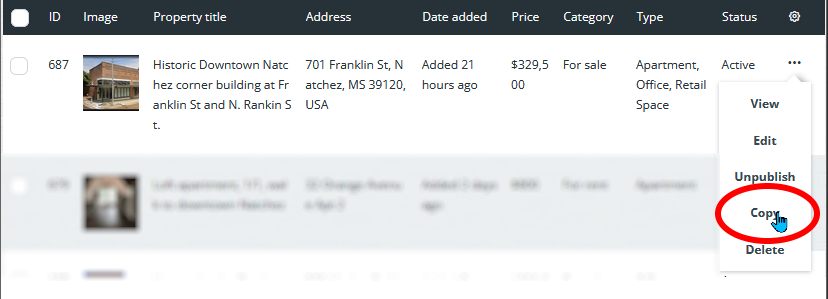
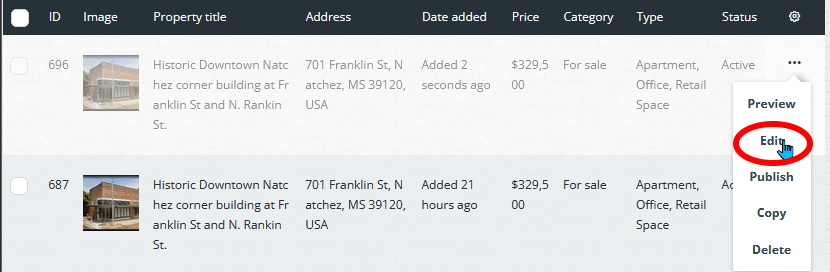
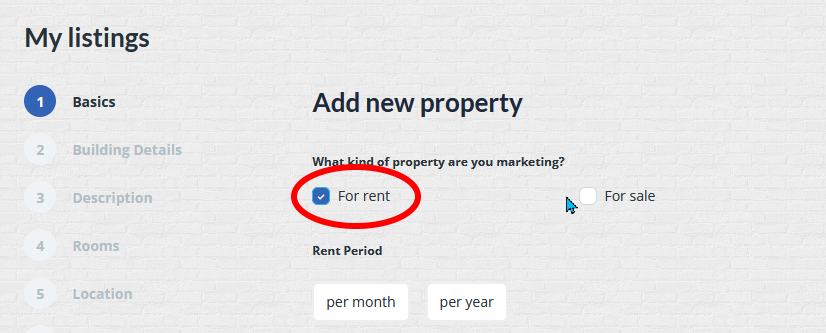
Then, find the copy you made, and update it to For Rent (assuming the original property was for-sale, otherwise, do vice-versa)
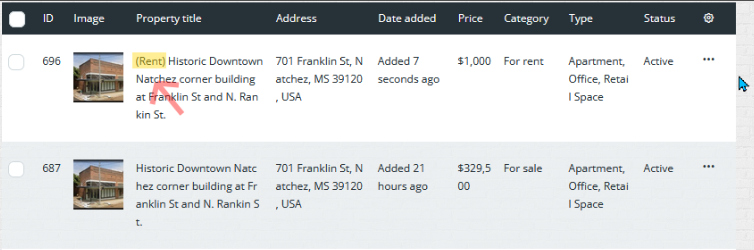
We recommend putting (Rent) and (Sale) in the title of each of the properties to help differentiate